


Most SaaS teams are bolting AI onto their products without asking whether it belongs. Here's a practical framework for deciding where AI earns its place, and where it's just adding noise.
In the last twelve months, almost every funded SaaS team we've worked with has had some version of the same conversation. The investors are asking about AI. The competitors are shipping AI features. The product team is being asked to add AI somewhere, anywhere, fast.
What usually follows is a sprint to bolt AI onto the product or even rebrand the domain from “.com” to “.ai”. Adding a chat widget in the corner of the dashboard. An “AI summarize” button on existing reports.A natural-language search bar that nobody asked for.
A quarter later, the team looks at the usage data and finds something uncomfortable. The AI feature is barely being used. The users who do try it bounce off it after one or two attempts. The investors stop asking about it. The team quietly moves on to the next thing.
AI is not a feature. It's a different way of building features. SaaS teams that treat it as something to add are usually doing it wrong. Teams that treat it as something to redesign around are usually doing it right.
The difference between AI that lands and AI that gets ignored isn't model quality. It's product judgment. AI belongs in some parts of a SaaS product and doesn't belong in others, and the teams that move their numbers are the ones that learn to tell the difference.
Here's the framework we use with funded SaaS clients to figure out where AI actually belongs in their product.
The wrong way to add AI to a SaaS product
Before the framework, it's worth being specific about what most teams get wrong, because the patterns are remarkably consistent.
Pattern 1: AI as a chat widget bolted on top
The most common mistake. Take an existing product, add a chat interface in the corner, label it "AI Assistant," and call it shipped. Users open it once, ask a few questions, get answers that are slightly worse than just using the product directly, and never come back.
The problem isn't the AI. The problem is the framing. A chat widget in a SaaS product has to compete with the rest of the interface for attention, and most of the time the interface is faster and clearer than the chat. Chat is a great surface for open-ended exploration. It's a poor surface for tasks the existing UI already handles well.
Pattern 2: AI as a magic button on existing screens
"Summarize with AI." "Generate with AI." "Improve with AI." These buttons are scattered through SaaS products like decorative stickers. Each one is supposed to feel impressive. Each one usually feels generic.
The issue is that these buttons rarely save the user meaningful effort. The summary is fine but not great. The generated content needs editing anyway. The improvement is hard to evaluate. The user does the work either way, just with one extra step in the middle.
Pattern 3: AI as a feature in the press release, not the product
The team announces an AI feature with a polished launch video. The actual implementation, when users get to it, is shallow. The AI works on a demo input but struggles with real ones. The feature is technically present but practically irrelevant.
This pattern is the most dangerous because it trains users to distrust the product. Once a user has been burned by AI features that don't work, they assume the next AI feature won't work either, even if it's genuinely good.
Four places AI actually earns its keep in SaaS
In our experience, AI belongs in a SaaS product in four specific situations. If your AI feature doesn't fit one of these, it probably shouldn't ship, no matter how good the underlying model is.
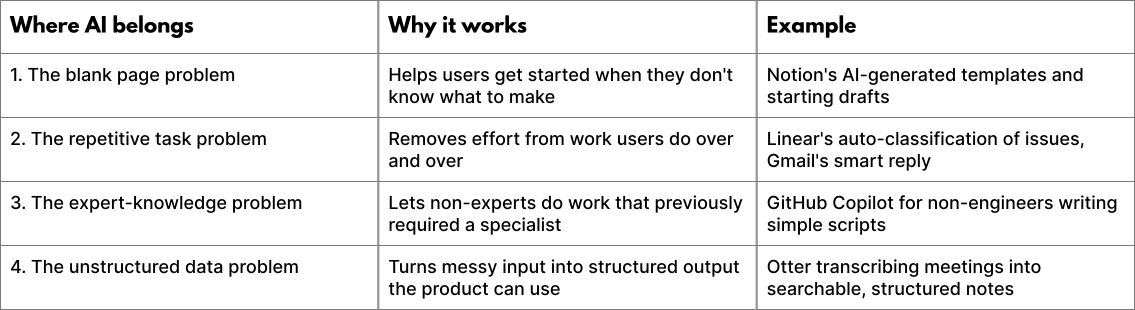
Let's break each one down.
1. The blank page problem
Many SaaS products start the user with a blank canvas. A blank document. An empty database. A new project with no content. For first-time users, this is one of the highest-friction moments in the entire product, because the user has to invent something before they can do anything.
AI is exceptionally good at solving this. Not by replacing the user's creativity, but by giving them a starting point they can edit, react to, or ignore.
Notion's approach is the cleanest example. When a user creates a new page, Notion offers AI-generated starting structures based on what the user is trying to do. The user is no longer staring at a blank canvas. They're editing a draft, which is psychologically a much smaller commitment.
The key principle: AI works best when it lowers the cost of getting started, not when it replaces the work itself.
2. The repetitive task problem
Every SaaS product has tasks that users do dozens or hundreds of times. Categorizing tickets. Tagging documents. Writing similar replies. Triaging issues. Sorting leads.
These are tasks where the user already knows what they want to do. They just don't want to keep doing it manually. AI shines here because the task is well-defined, the success criteria are clear, and even imperfect automation saves real time.
Linear's automatic issue classification is a good example. The user creates an issue. Linear suggests labels, priority, and assignee based on the content. The user can accept, edit, or ignore. The AI is doing a small task well, in the background, without demanding attention.
The key principle: AI works best when it removes effort from a task the user has already decided to do, not when it's trying to convince them to do something new.
3. The expert-knowledge problem
Some SaaS products serve users who would benefit from expertise they don't have. A small business owner reading a contract. A non-technical marketer writing SQL. A founder analyzing financial data they don't fully understand.
In these cases, the user has the intent but lacks the skill bridge. AI can fill that gap, not by doing the entire task, but by translating between what the user wants and what the system needs.
The interfaces that get this right share a pattern. The AI explains its reasoning, shows what it did, and lets the user verify. It treats the user as the decision-maker and itself as the assistant. Bad versions of this pattern hide the work behind a magic button. Good versions show the work and invite the user to learn.
The key principle: AI works best as a translator between user intent and system complexity, not as a black box that hides both.
4. The unstructured data problem
SaaS products thrive on structured data, rows in a database, tagged customers, classified tickets, categorized expenses but most input from the real world arrives unstructured meetings, voice notes, emails, PDFs, photos, customer calls.
AI is uniquely good at turning unstructured input into structured output. A meeting transcript becomes a list of action items. An email thread becomes a CRM entry. A photo of a receipt becomes a categorized expense. The user gets the structure without the manual data entry.
This is one of the highest-leverage places to use AI in a SaaS product, because it solves a problem that previously had no good solution. The user wasn't doing this work better before AI. They were either doing it badly, paying someone else to do it, or skipping it entirely.
The key principle: AI works best when it makes possible work that wasn't economically possible before, not when it slightly improves work users were already doing fine.
Where AI doesn't belong in SaaS (and the team should resist)
The inverse is just as important. Knowing where AI shouldn't go is what separates teams that ship thoughtfully from teams that ship reactively.
1. Tasks the existing UI does well
If a user can already accomplish a task in three clicks, an AI chat that requires a sentence and a wait time is a downgrade. The bar AI has to clear is not "does this work," it's "is this better than what already works."
Most product UIs have been refined over years, AI features are being added in months. The new feature is rarely better than the old workflow, even when the underlying model is impressive users are very good at noticing this gap.
2. Tasks where being wrong is expensive
AI features that are right 90% of the time sound great until you imagine the 10%. In some product surfaces, that 10% is fine. In others, it's catastrophic.
A misclassified email tag is annoying. A misclassified financial transaction is a problem. A misgenerated paragraph is editable. A misgenerated legal clause is a liability. The cost of error has to fit the surface. If it doesn't, AI doesn't belong there.
3. Tasks the user wants to do themselves
Some work is the work. A novelist doesn't want AI to write their sentences. A designer doesn't want AI to make their design choices. A senior engineer doesn't want AI to make their architectural decisions.
AI added to surfaces where the user wants to be the author feels invasive, even when it's optional. The presence of the feature implies that the system thinks the user shouldn't be doing this work themselves. That's a position users notice, and resent.
4. Tasks where AI is the marketing, not the value
If the AI feature exists primarily so the team can say the product has AI, the users will know. They always know. The feature will have the polish of a press release and the depth of a placeholder. It will sit in the product, unused, taking up space that could have gone to something users actually wanted.
A diagnostic for your own product
If your team is currently planning, building, or shipping AI features, run them through this checklist before going further.
- Does this AI feature solve one of the four problems above (blank page, repetition, expertise gap, unstructured data)? If not, why is it being built?
- Is the AI version of this task measurably better than the existing UI version, or is it just newer? If it's only newer, the existing UI probably wins.
- What happens when the AI is wrong? Is the user going to be lightly annoyed, or seriously harmed? If serious harm is possible, the surface needs guardrails or shouldn't have AI at all.
- Is this feature something users have asked for, or is it something the team is shipping because investors and competitors expect AI in the roadmap? Be honest with the answer.
- If you removed every reference to AI from the marketing of this feature, would users still want it? If not, the feature is positioning, not product.
The questions are uncomfortable on purpose. Most AI features being built right now wouldn't survive them. That's not a critique of AI. It's a critique of how teams are deploying it.
Where this leaves a funded SaaS team in 2026
The pressure to add AI to a SaaS product isn't going away. Investors will keep asking. Competitors will keep shipping. The market will keep rewarding visible AI moves, at least in the short term.
But the teams that win in the medium term won't be the ones that shipped AI fastest. They'll be the ones that figured out where AI actually belongs in their product, redesigned around it thoughtfully, and resisted the temptation to add it where it didn't belong.
This is, fundamentally, a design problem. The model is not the hard part. The hard part is deciding which user moments deserve AI and which don't, and then designing those moments so that the AI feels like part of the product, not a sticker on top of it.
The next generation of great SaaS products won't be the ones with the most AI. They'll be the ones where AI is invisible, because it's been designed into the workflow rather than bolted onto the interface.
If your team is currently figuring out where AI should live in your product, that question is worth more careful thought than it usually gets. The cost of getting it wrong isn't just a wasted feature. It's a product that feels confused to its users, in a moment when clarity is the highest-leverage thing a SaaS company can have.
WORK WITH VENTURE REPUBLIC
Want help figuring out where AI belongs in your product?
We work with funded SaaS teams to identify the user moments where AI genuinely earns its keep, then design those moments so they feel native to the product. We'll audit your current AI roadmap, tell you which features are worth shipping and which aren't, and redesign the ones that are.
Get a free AI product teardown. venturerepublic.net/start-a-project
.jpg)


